Releasing Version 6.0 of Square Dance Tech’s Tip Randomizer.
Before I get too far into the weeds on this, a shout out to Ri-Shea Schlitter for her invaluable help in field testing the software. Her recommendations to improve it were insightful and helped make this a far superior product. I’m deeply indebted for her efforts. Thank you, Ri!
Here are some highlights of the program:
- You don’t need scan cards.
- You don’t need scanners.
- You don’t need software.
- There are no apps to download. Everything runs in a browser window.
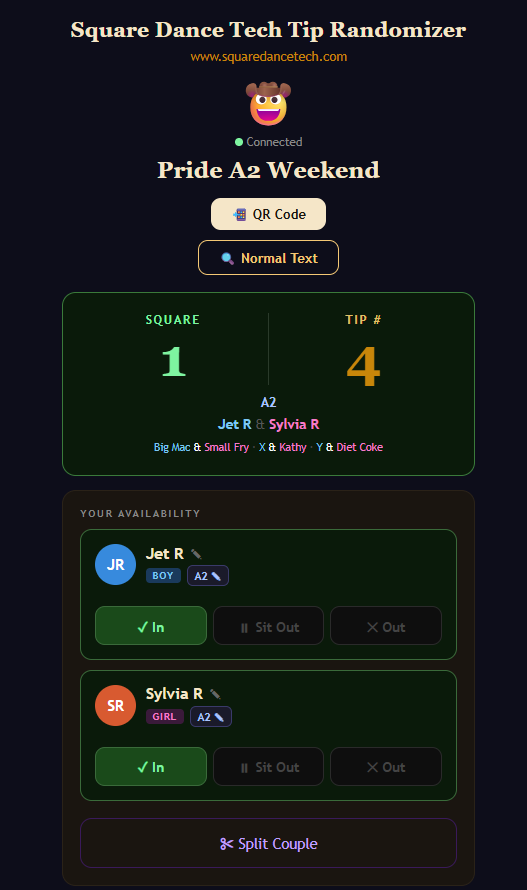
- The dancers get their notifications of square assignments on their phones. No need for dozens of people to gather around a tiny monitor to see where they’re dancing.
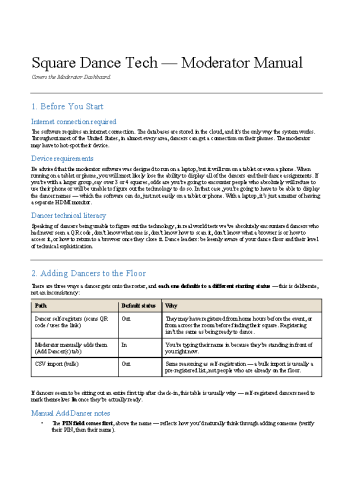
I designed the moderator part of the software to work on a laptop. But in Ri’s testing, she’s proven the moderator part of the software can be easily used with a tablet . . . or even just a phone. Me, personally, I wouldn’t want to moderate this for an event that’s got more than 3 squares on a phone, but it is doable.
You WILL need an internet connection and the dancers will need to be able to connect to the ‘net, too. All of the data resides online.
Granted, because of an internet connection being necessary, if you’re dancing in the middle of a desert, you probably won’t have a connection and would not be able to use this program. But at least throughout the United States, almost every dance venue I can think of, the dancers will be able to use their mobile devices to connect and the moderator should be able to hot-spot a laptop.
Another caveat: In some real world tests, some dancers not only didn’t know what a browser was, they’d never encountered a QR code, either, or how to scan one. Some dancers wouldn’t know where to find their browser on their mobile devices even if they had a clue what a browser it. It would be in the event’s interest to have MULTIPLE QR codes taped in strategic locations here and there around the event. Then teaching the dancers how to scan a QR code, they may wind up with 15 open browser windows, but at least they’d be able to see their assignments. Bottom line: Evaluate your audience.
Dancers will be able to:
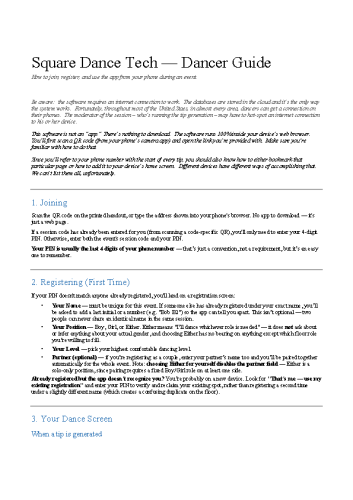
- Then they’ll be able to sign in themselves and their partner (if they have one).
- They can indicate which position they would like to dance — boy or girl if signing on as a couple. If signing on as a solo, the dancer can also indicate dancing in EITHER position.
- The dancer can also pick their highest dance level: Student, Mainstream, Plus, A1, A2, or one of the challenge levels. This way, if an event has mixed levels, no one has to sign out and sign back in with a different level. For example, if you have an advanced event, but with C1 star tips, any C1 dancer can dance the advanced tips obviously. When it comes time for the C1 star tip, the moderator selects the C1 level. Anyone who doesn’t dance at that level or higher would be automatically excluded without the dancers or moderators needing to make any adjustments.
- From their phones, the dancers can mark themselves in or out . . . and they can also choose to sit out a single session. If they choose the “sit out” option, they will automatically be made available for the next tip, without the dancer or moderator having to do anything.
- Additionally, one member of a couple can choose to mark themselves out. When that occurs, the dancer remaining available can change his or her dance position. For example, the boy sits out, the girl stays in. The system will prompt: Do you wish to change the girl’s position to Boy or Either? If the girl changes her position, that’s how the randomizer engine will view her. Once the boy in the couple becomes active again, the system will automatically revert the positions back to their original ones.
- Also, the couple can choose to split and dance separately. This comes in handy during classes when both members could be angels. Choose the split option allows each member of the couple to pick their dance position, boy, girl, or either, and their status: in / out / sit out.
But what about people who don’t have a cell phone or prefer not to use it or are unable, for any reason, to scan a QR code. That’s no problem, either. The moderator can manually add dancers. There is still a display screen that will show every dance’s square assignment once a new tip has been generated. The display screen can show up to 100 dancers. The display screen also lists every dancer, not just the couple’s name. So you can always look for your own name on the display (if you’re not using your phone to see your square assignment.)
Oh, and one other thing: this program is COMPLETLEY FREE. It won’t cost you, your club, event, or organization any thing. Completely free of charge.
The manuals are below. Simply click on them to download.
If you’d like me to set up your club / event / organization for you to play with the software, just fill out the form at the bottom.